


Roo Code Debuts as an Autonomous AI Agent in VS Code with Gemini Integration
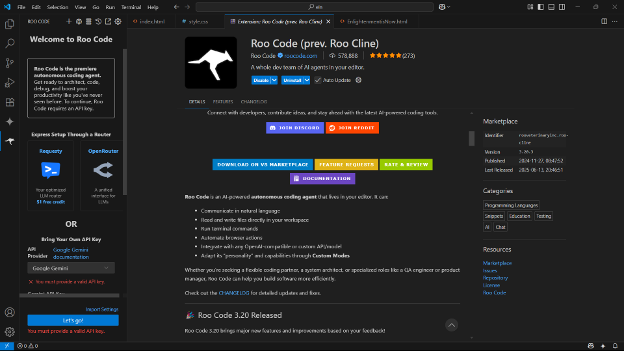
For years, developers have been promised AI tools that could take them from an idea straight to a working app with minimal effort. The dream is simple: stay focused on the concepts and vision while the code emerges automatically, refined step by step by a generative AI engine. While many tools have come close, they’ve often fallen short of that vision, either by requiring too much manual intervention or by being more proof-of-concept than production-ready. With Roo Code, the promise feels closer to being fulfilled—it’s not about removing developers from the loop entirely, but about allowing them to focus more on ideas while AI takes on the heavy lifting.
Getting started with Roo Code is straightforward, but it does require connecting the tool to a compatible AI API. Roo Code acts as a smart middle layer between your application and the AI engine, processing your prompts, analyzing your project’s context, and then applying changes directly to your codebase. Out of the box, it supports services like Google’s Gemini, which I opted to use. Roo Code itself is free to install, though API usage costs will depend on your chosen provider’s rates.
A particularly powerful feature is how Roo Code runs commands in the terminal. This isn’t just about file edits—it can execute operations, set up dependencies, and handle tasks that a developer would typically do manually. On my Windows setup, I initially ran into issues with Git Bash inside VS Code, which caused command execution errors. Switching to PowerShell and adjusting permissions as instructed solved the problem. It was a reminder that, while Roo Code is pushing the boundaries of what AI can do inside an IDE, it still requires some setup and fine-tuning to work smoothly.
What really makes Roo Code stand out is its approach to agency. Instead of dumping AI-generated code for you to copy and paste, it works through diffs—proposed file changes that you can review and approve. This strikes a balance between AI autonomy and developer oversight. The diff model plays to AI’s strengths (text manipulation at scale) while keeping humans in the loop, ensuring that changes are both traceable and intentional. It’s a step beyond traditional coding assistants and a move toward truly agentic AI development, where the AI not only suggests but actively shapes the project.