

Jakarta EE 10 Arrives with Focus on Building Modern, Simplified, Lightweight Cloud-Native Java Applications, Including a Core Profile for Microservices.
Jakarta EE 10, the latest version of the Eclipse Foundation’s enterprise Java platform, has been released, with a significant emphasis on developing cloud-native applications.
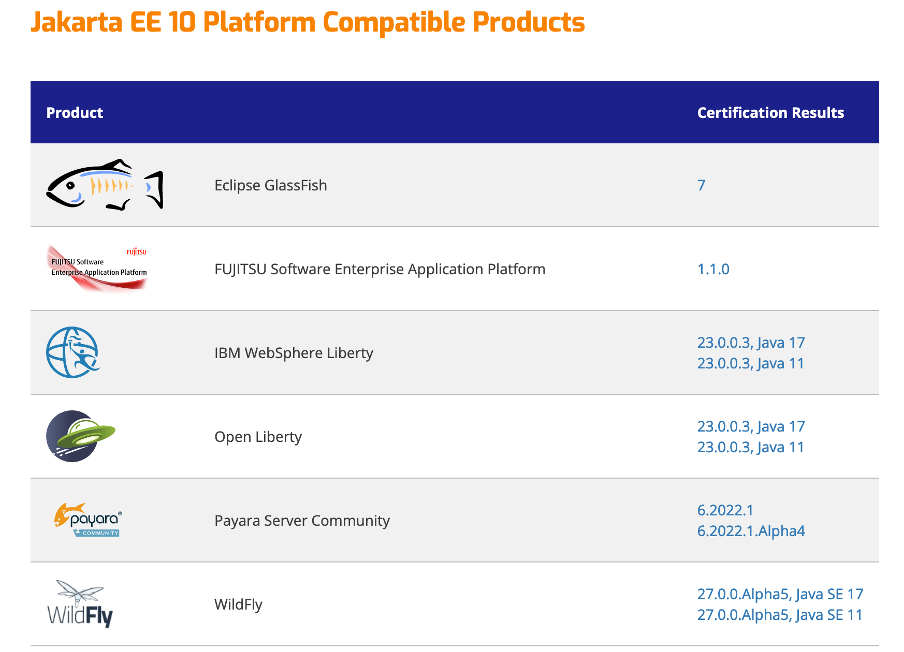
Included in the release are specifications such as Jakarta EE 10 Platform, Web Profile, and the new Core Profile. One compatible implementation of Jakarta EE 10 is available through the Eclipse GlassFish 7 application server, with additional implementations expected soon from companies like IBM.
Jakarta EE 10 focuses on enabling the creation of modern, simplified, and lightweight cloud-native Java applications. This version provides a foundation for the ongoing evolution of enterprise Java technologies, according to the Eclipse Foundation.
The Jakarta EE 10 release can be downloaded from the project’s website. Notable features and capabilities of Jakarta EE 10 include:
- Core Profile: This new profile offers a subset of Jakarta EE specifications targeting smaller runtimes suitable for microservices development. It includes the CDI-Lite specification, which supports building lightweight Jakarta EE applications. CDI-Lite provides a reflection-free programming model, enabling native compilation through build-compatible extensions. This is the first new profile for enterprise Java in over a decade.
- Java SE Compatibility: Jakarta EE 10 supports application development on Java SE 10 and Java SE 17, aligning with recent versions of the standard Java platform.
- Simplified Development: Broader use of annotations simplifies application development, facilitating the construction of modularized applications and enhancing integration across component APIs.
- Module System Support: Building on Java SE 9’s module system, Jakarta EE 10 continues to support modular development practices introduced in Java SE 11.
- Updated Component Specifications: The release features updates to more than 20 component specifications, such as Jakarta Contexts and Dependency Injection (CDI) 4.0, Jakarta RESTful Web Services 3.1, and Jakarta Security 3.0. New functions include support for OpenID Connect and enhancements in Jakarta Persistence queries.

Jakarta EE 10 is built on Java SE 17. While standard Java includes the JVM and core libraries, Jakarta EE extends it with standard APIs beneficial for building enterprise applications, including capabilities for security and persistence.
Enterprise Java, as described by Red Hat (a contributor to Jakarta EE 10), is the use of Java for developing large-scale enterprise software. It merges a collection of APIs with application servers that implement these APIs, serving sectors such as government, telecommunications, banking, accounting, and e-commerce.
Contributors to Jakarta EE 10 include major companies like IBM, Oracle, Fujitsu, Payara, and Tomitribe. Eclipse assumed responsibility for developing enterprise Java, previously known as Java EE (Enterprise Edition), after Oracle handed over the reins in 2017.
The previous generation, Jakarta EE 9, was released in December 2020, introducing a new namespace.