

Close Menu
Şevket Ayaksız

    Subscribe to Updates

    Get the latest creative news from FooBar about art, design and business.

    What's Hot

    Microsoft admits Windows 11 still relies on 1990s-era code

    Mayıs 8, 2026

    Ploopy Bean brings TrackPoint-style control to a quirky mouse design

    Mayıs 8, 2026

    Ugreen 4-port GaN charger drops 40% to $33

    Mayıs 8, 2026
    Facebook X (Twitter) Instagram
    • software
    • Gadgets
    Facebook X (Twitter) Instagram
    Şevket AyaksızŞevket Ayaksız
    Subscribe
    • Home
    • Technology

      Google Maps vs Waze: I Put the Two Best Navigation Apps Head-to-Head — and One Clearly Came Out on Top

      Mayıs 1, 2026

      T-Mobile Bundles Free Hulu and Netflix for 5G Users: Eligibility Explained

      Mayıs 1, 2026

      This Portable Mini PC Is the Unexpected Raspberry Pi Alternative You Might Actually Want

      Mayıs 1, 2026

      Samsung warns RAM shortages could worsen beyond 2027

      Mayıs 1, 2026

      Oxford study finds friendly AI chatbots are less accurate

      Mayıs 1, 2026
    • Adobe
    • Microsoft
    • java
    • Oracle
    Şevket Ayaksız
    Anasayfa » Windows 11 adds option to disable AI taskbar sharing
    Windows

    Windows 11 adds option to disable AI taskbar sharing

    By ayaksızŞubat 26, 2026Yorum yapılmamış2 Mins Read
    Facebook Twitter Pinterest LinkedIn Tumblr Email
    Share
    Facebook Twitter LinkedIn Pinterest Email

    Microsoft is experimenting with a new Windows 11 feature that would let AI assistants access individual app windows directly from the taskbar.

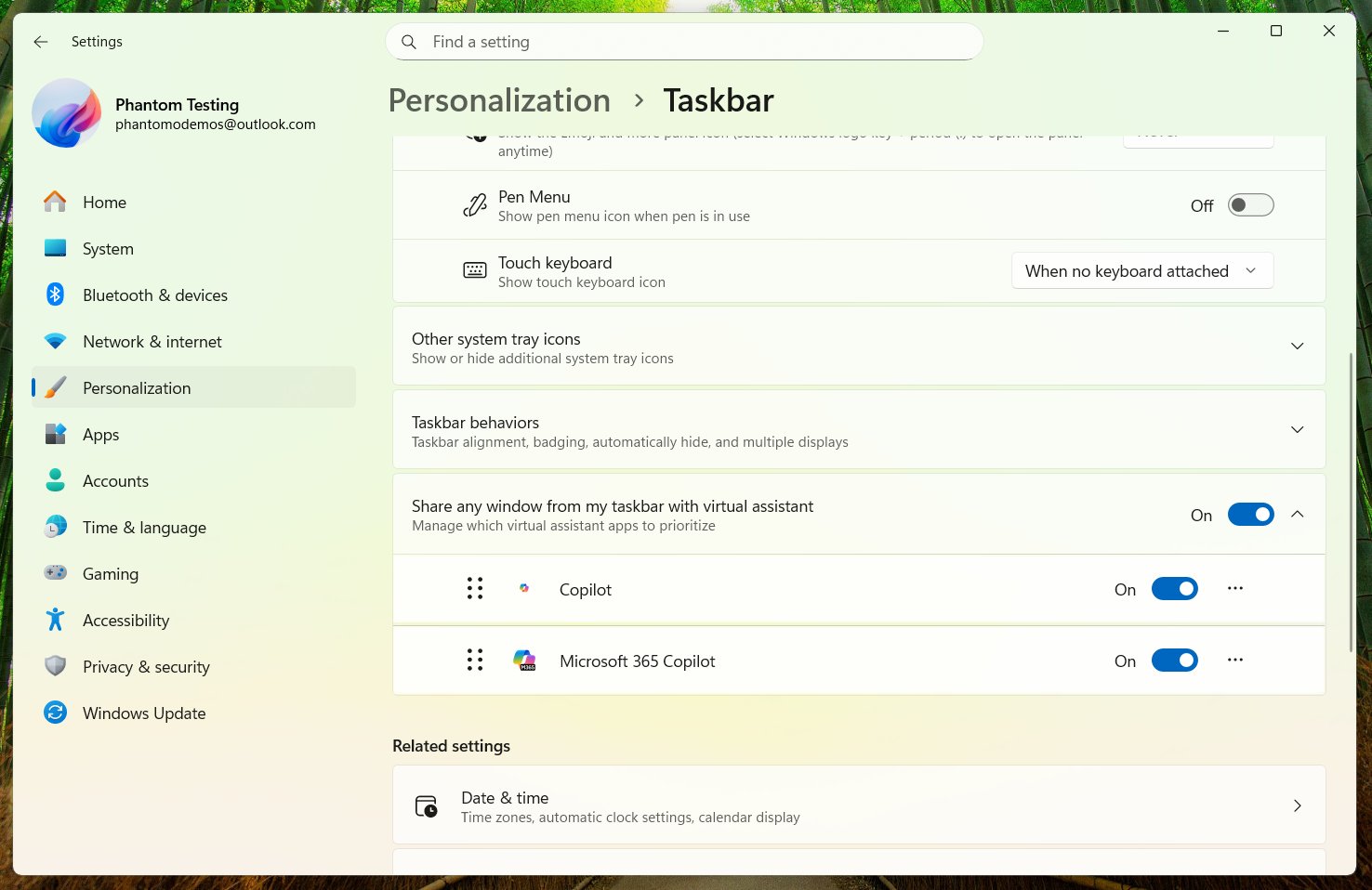
    The feature, labeled “Share any window from my taskbar with virtual assistant,” allows users to share a specific open window with an AI tool—such as Microsoft Copilot—without launching a traditional screen-sharing session. It was first discovered in preview builds by Windows data miner @phantomofearth.

    Instead of sharing the entire desktop, users can grant access to a single app window straight from the taskbar interface. Once shared, the AI assistant can read visible content within that window, summarize information, offer contextual suggestions, and visually guide users through certain actions.

    At this stage, the assistant functions strictly as a reading and support layer. It cannot take control of the app, click buttons, or directly manipulate content. The interaction remains advisory rather than interactive.

    Privacy appears to be a consideration in the rollout. The feature is optional and disabled by default. Users who wish to enable it must do so manually in Windows 11 settings, and it can be turned off entirely at any time.

    If fully implemented, the feature could streamline how users interact with AI tools inside Windows 11—especially for tasks like summarizing documents, analyzing spreadsheets, or troubleshooting settings—without requiring full screen access. Microsoft has not yet announced when or if the feature will roll out to all users.

    Post Views: 99
    Share. Facebook Twitter Pinterest LinkedIn Tumblr Email
    ayaksız
    • Website

    Related Posts

    Microsoft’s faster, cleaner Windows 11 vision comes into focus

    Mayıs 3, 2026

    Windows 11 April update breaks some third-party backup apps

    Mayıs 1, 2026

    Windows 11 fixes two major design complaints, including taskbar limits

    Nisan 8, 2026
    Add A Comment

    Comments are closed.

    Editors Picks
    8.5

    Apple Planning Big Mac Redesign and Half-Sized Old Mac

    Ocak 5, 2021

    Autonomous Driving Startup Attracts Chinese Investor

    Ocak 5, 2021

    Onboard Cameras Allow Disabled Quadcopters to Fly

    Ocak 5, 2021
    Top Reviews
    9.1

    Review: T-Mobile Winning 5G Race Around the World

    By sevketayaksiz
    8.9

    Samsung Galaxy S21 Ultra Review: the New King of Android Phones

    By sevketayaksiz
    8.9

    Xiaomi Mi 10: New Variant with Snapdragon 870 Review

    By sevketayaksiz
    Advertisement
    Demo
    Şevket Ayaksız
    Facebook X (Twitter) Instagram YouTube
    • Home
    • Adobe
    • microsoft
    • java
    • Oracle
    • Contact
    © 2026 Theme Designed by Şevket Ayaksız.

    Type above and press Enter to search. Press Esc to cancel.