

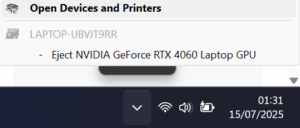
Can you eject your graphics card while using your PC? If you have an external GPU setup, sure — but if your GPU is inside your desktop or laptop, it’s generally a no-go. So Windows 11 users were understandably shocked when some saw a prompt asking them to eject their graphics card.
This is actually a bug where Windows mistakenly lists GPUs in the “Safely remove hardware” menu — the same one meant for safely unplugging USB drives. Since most people never actually use this tool for flash drives, seeing their expensive built-in GPU listed there understandably caused confusion.
The bug relates to Windows offering the ability to disable the discrete GPU to switch to integrated graphics and save power. Unfortunately, the UI shows “eject” instead of “disable,” which isn’t accurate and can worry users. Some guides suggest registry tweaks to remove this option.
Though it’s not a severe problem, it can cause concern for users who fear accidentally “ejecting” their GPU. One Reddit user worried, “I’m afraid I might accidentally eject it one day and god knows what’s gonna happen.” If you’re encountering this, and you’d rather not tinker with your system, it’s safest to just ignore the prompt.