

Close Menu
Şevket Ayaksız

    Subscribe to Updates

    Get the latest creative news from FooBar about art, design and business.

    What's Hot

    Microsoft quietly removes Windows 11’s 32GB RAM recommendation

    Ağustos 6, 2026

    Samsung’s new 2TB 990 SSD drops to its lowest price yet

    Ağustos 6, 2026

    AI safety tests keep spilling beyond the lab

    Ağustos 6, 2026
    Facebook X (Twitter) Instagram
    • software
    • Gadgets
    Facebook X (Twitter) Instagram
    Şevket AyaksızŞevket Ayaksız
    Subscribe
    • Home
    • Technology

      Samsung’s new 2TB 990 SSD drops to its lowest price yet

      Ağustos 6, 2026

      OpenAI’s AI incident highlights the need for digital disaster planning

      Ağustos 4, 2026

      New underwater habitat marks major milestone for human ocean living

      Ağustos 3, 2026

      DuckDuckGo unveils ‘Anti-AI’ sunglasses with a privacy-first message

      Ağustos 3, 2026

      Samsung expects global RAM shortage to continue through 2027

      Ağustos 2, 2026
    • Adobe
    • Microsoft
    • java
    • Oracle
    Şevket Ayaksız
    Anasayfa » Don’t Try to Eject Your GPU via Windows 11 Taskbar
    Windows

    Don’t Try to Eject Your GPU via Windows 11 Taskbar

    By ayaksızTemmuz 17, 2025Yorum yapılmamış2 Mins Read
    Facebook Twitter Pinterest LinkedIn Tumblr Email
    Share
    Facebook Twitter LinkedIn Pinterest Email

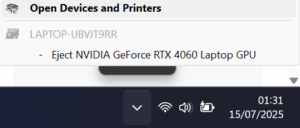
    Can you eject your graphics card while using your PC? If you have an external GPU setup, sure — but if your GPU is inside your desktop or laptop, it’s generally a no-go. So Windows 11 users were understandably shocked when some saw a prompt asking them to eject their graphics card.

    This is actually a bug where Windows mistakenly lists GPUs in the “Safely remove hardware” menu — the same one meant for safely unplugging USB drives. Since most people never actually use this tool for flash drives, seeing their expensive built-in GPU listed there understandably caused confusion.

    The bug relates to Windows offering the ability to disable the discrete GPU to switch to integrated graphics and save power. Unfortunately, the UI shows “eject” instead of “disable,” which isn’t accurate and can worry users. Some guides suggest registry tweaks to remove this option.

    Though it’s not a severe problem, it can cause concern for users who fear accidentally “ejecting” their GPU. One Reddit user worried, “I’m afraid I might accidentally eject it one day and god knows what’s gonna happen.” If you’re encountering this, and you’d rather not tinker with your system, it’s safest to just ignore the prompt.


    Post Views: 336
    Share. Facebook Twitter Pinterest LinkedIn Tumblr Email
    ayaksız
    • Website

    Related Posts

    Windows 11 finally brings movable taskbar in new Insider preview

    Ağustos 4, 2026

    Windows 11 to speed up and simplify its right-click menu

    Ağustos 2, 2026

    Windows 11 adds fingerprint sign-in support for desktop PCs

    Temmuz 31, 2026
    Add A Comment

    Comments are closed.

    Editors Picks
    8.5

    Apple Planning Big Mac Redesign and Half-Sized Old Mac

    Ocak 5, 2021

    Autonomous Driving Startup Attracts Chinese Investor

    Ocak 5, 2021

    Onboard Cameras Allow Disabled Quadcopters to Fly

    Ocak 5, 2021
    Top Reviews
    9.1

    Review: T-Mobile Winning 5G Race Around the World

    By sevketayaksiz
    8.9

    Samsung Galaxy S21 Ultra Review: the New King of Android Phones

    By sevketayaksiz
    8.9

    Xiaomi Mi 10: New Variant with Snapdragon 870 Review

    By sevketayaksiz
    Advertisement
    Demo
    Şevket Ayaksız
    Facebook X (Twitter) Instagram YouTube
    • Home
    • Adobe
    • microsoft
    • java
    • Oracle
    • Contact
    © 2026 Theme Designed by Şevket Ayaksız.

    Type above and press Enter to search. Press Esc to cancel.