


Close Menu
Şevket Ayaksız

    Subscribe to Updates

    Get the latest creative news from FooBar about art, design and business.

    What's Hot

    Eero Signal Ensures Continuous Business Connectivity Even During Internet Outages

    Mayıs 1, 2026

    7 Simple but Surprising Ways to Boost Your TV’s Sound Quality at Home

    Mayıs 1, 2026

    From AI Pilots to Enterprise Value: Building the Superhighway

    Mayıs 1, 2026
    Facebook X (Twitter) Instagram
    • software
    • Gadgets
    Facebook X (Twitter) Instagram
    Şevket AyaksızŞevket Ayaksız
    Subscribe
    • Home
    • Technology

      7 Simple but Surprising Ways to Boost Your TV’s Sound Quality at Home

      Mayıs 1, 2026

      From AI Pilots to Enterprise Value: Building the Superhighway

      Mayıs 1, 2026

      How I Fixed My Home Wi-Fi Dead Zones: 6 Practical Solutions That Made a Real Difference

      Mayıs 1, 2026

      Why I Switched From iPhone Hotspot to a 5G Travel Router for Good

      Nisan 18, 2026

      Verizon Offers Free iPad or Apple Watch With New iPhone Purchase: Here’s How It Works

      Nisan 18, 2026
    • Adobe
    • Microsoft
    • java
    • Oracle
    Şevket Ayaksız
    Anasayfa » Microsoft Launches Innovative App for Remote PC Access
    microsoft

    Microsoft Launches Innovative App for Remote PC Access

    By ayaksızEylül 23, 2024Yorum yapılmamış3 Mins Read
    Facebook Twitter Pinterest LinkedIn Tumblr Email
    Share
    Facebook Twitter LinkedIn Pinterest Email

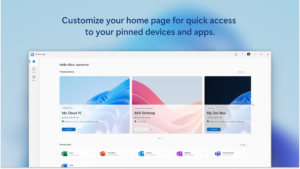
    Yesterday, Microsoft made headlines with the launch of its new Windows App, which is now available for a variety of platforms, including Windows, macOS, iOS, iPadOS, and web browsers. This app aims to revolutionize the way users access their Windows devices remotely, offering a streamlined, secure connection that eliminates the need for multiple remote desktop applications. With the integration of services such as Windows 365, Azure Virtual Desktop, Remote Desktop, and Microsoft Dev Box, Windows App provides a unified experience that simplifies the process of connecting to a Windows device from any supported platform.

    What sets the Windows App apart is its ability to cater to a diverse user base, from IT professionals managing corporate environments to everyday users accessing personal files. Microsoft has focused heavily on security, ensuring that users can work confidently from any location. The app has received positive feedback from early adopters, who have noted its seamless access and improved user experience. Imagine being on a train or waiting in an airport, yet still having the ability to read, edit, or manage crucial documents on your PC. With Windows App, this level of convenience is just a few taps away.

    The feature set of Windows App is designed to enhance productivity and flexibility. It offers unified access to a range of Windows services from a single interface, which includes cloud PCs, virtual desktops, and local PCs. Security measures such as multi-factor authentication ensure that your data remains safe during remote sessions. Users can also customize their start screens to suit their preferences, and the app supports multiple monitors and dynamic resolutions for an optimized viewing experience. Additionally, USB redirection allows local USB devices to be used seamlessly in remote sessions, enhancing the app’s utility. With optimizations for Microsoft Teams, collaboration has never been easier, and the in-app feedback function allows users to contribute to ongoing improvements.

    For those eager to try out the Windows App, it can be downloaded from the appropriate app stores, including the Microsoft Store, Google Play Store, and Apple App Store. Microsoft recommends that IT administrators review the “Get started with Windows App” documentation to ensure a smooth integration within their organizations. Alternatively, users can access the app through web browsers, which provides a hassle-free connection to their Windows devices without requiring software installation. However, it’s essential to remember that the Windows App operates exclusively with Microsoft accounts and compatible cloud services, meaning third-party platforms are not supported.


    Post Views: 271
    Share. Facebook Twitter Pinterest LinkedIn Tumblr Email
    ayaksız
    • Website

    Related Posts

    Microsoft launches tool to gather user feedback on Windows issues

    Nisan 8, 2026

    Microsoft outlines major Windows 11 reset focused on performance

    Nisan 8, 2026

    Microsoft says Windows 11 will speed up by scaling back Copilot

    Nisan 8, 2026
    Add A Comment

    Comments are closed.

    Editors Picks
    8.5

    Apple Planning Big Mac Redesign and Half-Sized Old Mac

    Ocak 5, 2021

    Autonomous Driving Startup Attracts Chinese Investor

    Ocak 5, 2021

    Onboard Cameras Allow Disabled Quadcopters to Fly

    Ocak 5, 2021
    Top Reviews
    9.1

    Review: T-Mobile Winning 5G Race Around the World

    By sevketayaksiz
    8.9

    Samsung Galaxy S21 Ultra Review: the New King of Android Phones

    By sevketayaksiz
    8.9

    Xiaomi Mi 10: New Variant with Snapdragon 870 Review

    By sevketayaksiz
    Advertisement
    Demo
    Şevket Ayaksız
    Facebook X (Twitter) Instagram YouTube
    • Home
    • Adobe
    • microsoft
    • java
    • Oracle
    • Contact
    © 2026 Theme Designed by Şevket Ayaksız.

    Type above and press Enter to search. Press Esc to cancel.