

Close Menu
Şevket Ayaksız

    Subscribe to Updates

    Get the latest creative news from FooBar about art, design and business.

    What's Hot

    AI watermarks could improve transparency but won’t stop AI slop

    Eylül 13, 2026

    LG’s 4K OLED gaming monitor gets a $600 discount

    Eylül 13, 2026

    Keychron’s 100-key macropad offers 8,000Hz polling for $65

    Eylül 13, 2026
    Facebook X (Twitter) Instagram
    • software
    • Gadgets
    Facebook X (Twitter) Instagram
    Şevket AyaksızŞevket Ayaksız
    Subscribe
    • Home
    • Technology

      Apple: iPhone 17 and Older Models Hit With Unexpected $100 Price Increase

      Eylül 10, 2026

      Apple Watch Intelligence Could Be a Major Accessibility Breakthrough

      Eylül 10, 2026

      Apple May Skip the Base iPhone 18 This Year

      Eylül 10, 2026

      FCC changes robot vacuum rules, potentially affecting future models

      Ağustos 8, 2026

      Samsung’s new 2TB 990 SSD drops to its lowest price yet

      Ağustos 6, 2026
    • Adobe
    • Microsoft
    • java
    • Oracle
    Şevket Ayaksız
    Anasayfa » Visual Studio Code Update Enables Automatic MCP Server Launch
    microsoft

    Visual Studio Code Update Enables Automatic MCP Server Launch

    By mustafa efeAğustos 31, 2025Yorum yapılmamış2 Mins Read
    Facebook Twitter Pinterest LinkedIn Tumblr Email
    Share
    Facebook Twitter LinkedIn Pinterest Email

    Visual Studio Code Update Adds Git Worktrees and Copilot Chat State Management
    Use MCP servers in VS Code

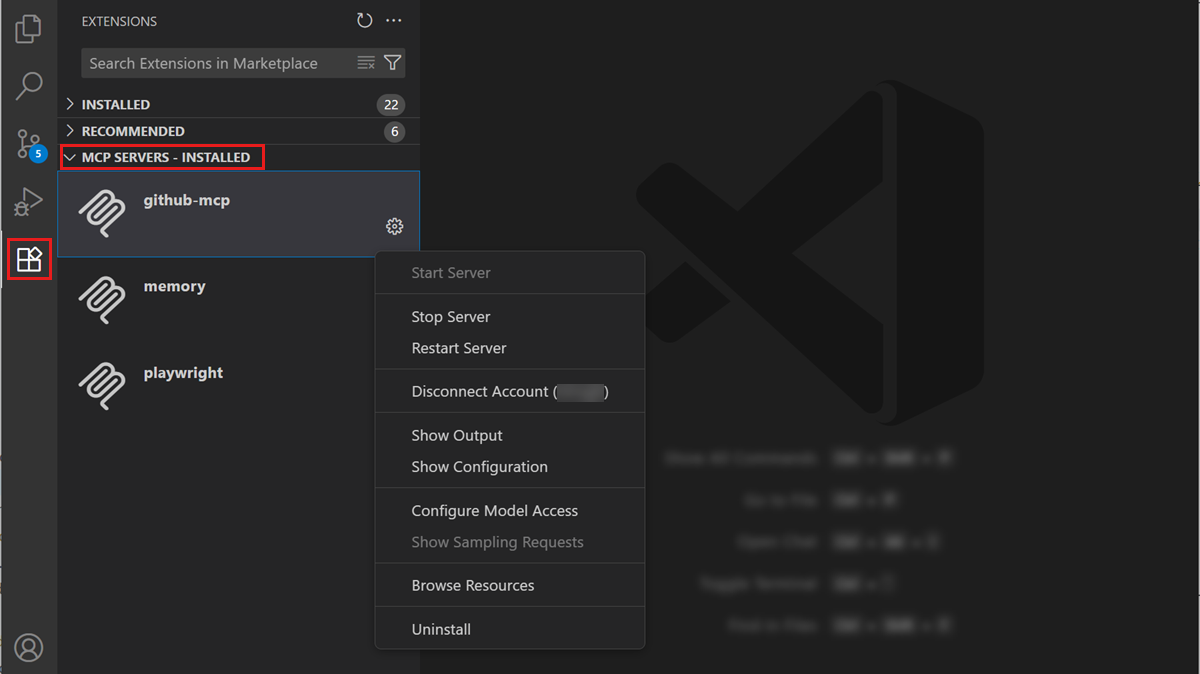
    The July 2025 release of Visual Studio Code (version 1.103) introduces a key enhancement: the ability to auto-start Model Context Protocol (MCP) servers. This update simplifies workflows for developers who rely on MCP, a protocol that enables applications to provide context to large language models (LLMs). With this feature, VS Code users no longer need to manually restart MCP servers after updates, streamlining the setup and reducing friction in AI-assisted development.

    Previously, when MCP server configurations were added or modified, VS Code displayed a blue “refresh” icon in the Chat View to manually reload the list of available tools. This process could be tedious, particularly in environments where multiple MCP servers or tools were in use. With auto-start support, MCP servers are launched automatically when VS Code starts, ensuring that all configured tools are immediately available for use without user intervention.

    In addition to auto-start capabilities, VS Code 1.103 introduces an experimental tool-calling mode for handling scenarios where the number of tools exceeds the previous maximum limit of 128. The editor now groups tools automatically and allows the LLM to call entire groups rather than individual tools, eliminating the need to manually deselect tools to avoid hitting limits. This change is particularly useful for developers working with complex AI workflows or extensive MCP server configurations.

    The release also brings full compliance with MCP specification version 2025-06-18, including support for resource_links and structured output in tool results. These improvements enhance interoperability and make it easier for developers to integrate external tools, access structured responses, and maintain consistent workflows within VS Code. Together, these updates strengthen the editor’s capabilities for AI-powered coding and large-scale tool management.

    Post Views: 377
    Visual Studio Code
    Share. Facebook Twitter Pinterest LinkedIn Tumblr Email
    mustafa efe
    • Website

    Related Posts

    AI watermarks could improve transparency but won’t stop AI slop

    Eylül 13, 2026

    Google lets Gemini users remove visible watermarks from AI images and videos

    Eylül 13, 2026

    OpenAI removes ChatGPT text chat limits for free and Go users

    Ağustos 8, 2026
    Add A Comment

    Comments are closed.

    Editors Picks
    8.5

    Apple Planning Big Mac Redesign and Half-Sized Old Mac

    Ocak 5, 2021

    Autonomous Driving Startup Attracts Chinese Investor

    Ocak 5, 2021

    Onboard Cameras Allow Disabled Quadcopters to Fly

    Ocak 5, 2021
    Top Reviews
    9.1

    Review: T-Mobile Winning 5G Race Around the World

    By sevketayaksiz
    8.9

    Samsung Galaxy S21 Ultra Review: the New King of Android Phones

    By sevketayaksiz
    8.9

    Xiaomi Mi 10: New Variant with Snapdragon 870 Review

    By sevketayaksiz
    Advertisement
    Demo
    Şevket Ayaksız
    Facebook X (Twitter) Instagram YouTube
    • Home
    • Adobe
    • microsoft
    • java
    • Oracle
    • Contact
    © 2026 Theme Designed by Şevket Ayaksız.

    Type above and press Enter to search. Press Esc to cancel.