


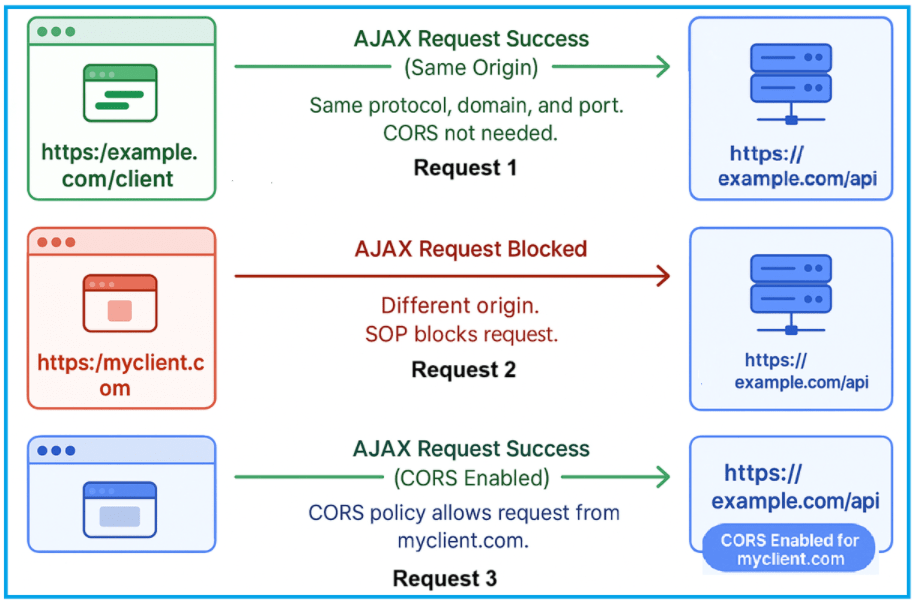
ASP.NET Core’s minimal APIs provide a streamlined approach to building web APIs with minimal setup and dependencies. Unlike traditional controller-based APIs, minimal APIs let developers define endpoints with concise syntax while still supporting robust features like routing, dependency injection, and security mechanisms such as Cross-Origin Resource Sharing (CORS). Even with their simplicity, minimal APIs are powerful enough to handle real-world API requirements efficiently.
Cross-Origin Resource Sharing (CORS) is a critical security feature for modern web applications, as it controls which external domains can access your API resources. In minimal APIs, configuring CORS is straightforward but requires careful setup to avoid exposing your API to unauthorized requests. This article will guide you through enabling and configuring CORS in a minimal API project using ASP.NET Core.
To start, you need Visual Studio 2022 installed on your system. Begin by creating a new ASP.NET Core Web API project: open Visual Studio, select “Create new project,” and choose the “ASP.NET Core Web API” template. In the configuration settings, select the framework version, ensure “Use controllers” is unchecked to enable minimal APIs, and leave authentication and other optional features disabled for simplicity. This clean setup provides the perfect environment to implement and test CORS configurations.
Once the project is created, you can add the CORS middleware in the Program.cs file. Define a named CORS policy specifying allowed origins, headers, and methods, then apply it to the request pipeline using app.UseCors(). This approach ensures that only trusted domains can interact with your API, helping maintain security while supporting cross-origin interactions required by modern web clients. By following these steps, you can quickly enable secure cross-origin requests in your minimal API projects.