


Close Menu
Şevket Ayaksız

    Subscribe to Updates

    Get the latest creative news from FooBar about art, design and business.

    What's Hot

    Valve targets a summer launch for Steam Machine but keeps pricing secret

    Haziran 7, 2026

    Chrome 149 patches a record 429 security vulnerabilities

    Haziran 7, 2026

    Corsair Nightsword V2 adds a built-in Stream Deck button

    Haziran 7, 2026
    Facebook X (Twitter) Instagram
    • software
    • Gadgets
    Facebook X (Twitter) Instagram
    Şevket AyaksızŞevket Ayaksız
    Subscribe
    • Home
    • Technology

      Valve targets a summer launch for Steam Machine but keeps pricing secret

      Haziran 7, 2026

      Intel and Phison aim to overcome local AI’s memory bottleneck

      Haziran 2, 2026

      Nvidia RTX Spark could transform the next generation of gaming handhelds

      Haziran 2, 2026

      HP OmniBook 5 drops to $699 with 16GB RAM and long battery life

      Mayıs 11, 2026

      Anker’s 9-port charging station drops to $34 on Amazon

      Mayıs 11, 2026
    • Adobe
    • Microsoft
    • java
    • Oracle
    Şevket Ayaksız
    Anasayfa » Enabling CORS in ASP.NET Core Minimal APIs
    software

    Enabling CORS in ASP.NET Core Minimal APIs

    By mustafa efeEkim 25, 2025Updated:Ekim 27, 2025Yorum yapılmamış2 Mins Read
    Facebook Twitter Pinterest LinkedIn Tumblr Email
    Share
    Facebook Twitter LinkedIn Pinterest Email

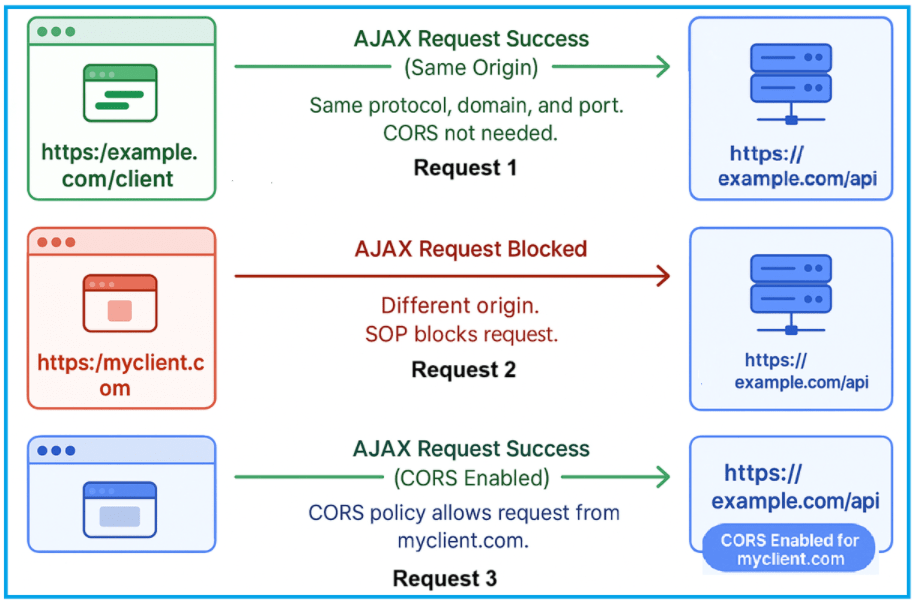
    CORS in ASP.NET Core Web API - Dot Net Tutorials

    ASP.NET Core’s minimal APIs provide a streamlined approach to building web APIs with minimal setup and dependencies. Unlike traditional controller-based APIs, minimal APIs let developers define endpoints with concise syntax while still supporting robust features like routing, dependency injection, and security mechanisms such as Cross-Origin Resource Sharing (CORS). Even with their simplicity, minimal APIs are powerful enough to handle real-world API requirements efficiently.

    Cross-Origin Resource Sharing (CORS) is a critical security feature for modern web applications, as it controls which external domains can access your API resources. In minimal APIs, configuring CORS is straightforward but requires careful setup to avoid exposing your API to unauthorized requests. This article will guide you through enabling and configuring CORS in a minimal API project using ASP.NET Core.

    To start, you need Visual Studio 2022 installed on your system. Begin by creating a new ASP.NET Core Web API project: open Visual Studio, select “Create new project,” and choose the “ASP.NET Core Web API” template. In the configuration settings, select the framework version, ensure “Use controllers” is unchecked to enable minimal APIs, and leave authentication and other optional features disabled for simplicity. This clean setup provides the perfect environment to implement and test CORS configurations.

    Once the project is created, you can add the CORS middleware in the Program.cs file. Define a named CORS policy specifying allowed origins, headers, and methods, then apply it to the request pipeline using app.UseCors(). This approach ensures that only trusted domains can interact with your API, helping maintain security while supporting cross-origin interactions required by modern web clients. By following these steps, you can quickly enable secure cross-origin requests in your minimal API projects.

    Post Views: 174
    Share. Facebook Twitter Pinterest LinkedIn Tumblr Email
    mustafa efe
    • Website

    Related Posts

    ChatGPT’s new “Dreaming” feature boosts memory and personalization

    Haziran 7, 2026

    Microsoft faces fresh security chaos after May Patch Tuesday

    Mayıs 24, 2026

    Microsoft is phasing out SMS verification for personal accounts

    Mayıs 19, 2026
    Add A Comment

    Comments are closed.

    Editors Picks
    8.5

    Apple Planning Big Mac Redesign and Half-Sized Old Mac

    Ocak 5, 2021

    Autonomous Driving Startup Attracts Chinese Investor

    Ocak 5, 2021

    Onboard Cameras Allow Disabled Quadcopters to Fly

    Ocak 5, 2021
    Top Reviews
    9.1

    Review: T-Mobile Winning 5G Race Around the World

    By sevketayaksiz
    8.9

    Samsung Galaxy S21 Ultra Review: the New King of Android Phones

    By sevketayaksiz
    8.9

    Xiaomi Mi 10: New Variant with Snapdragon 870 Review

    By sevketayaksiz
    Advertisement
    Demo
    Şevket Ayaksız
    Facebook X (Twitter) Instagram YouTube
    • Home
    • Adobe
    • microsoft
    • java
    • Oracle
    • Contact
    © 2026 Theme Designed by Şevket Ayaksız.

    Type above and press Enter to search. Press Esc to cancel.