

Close Menu
Şevket Ayaksız

    Subscribe to Updates

    Get the latest creative news from FooBar about art, design and business.

    What's Hot

    Eero Signal Ensures Continuous Business Connectivity Even During Internet Outages

    Mayıs 1, 2026

    7 Simple but Surprising Ways to Boost Your TV’s Sound Quality at Home

    Mayıs 1, 2026

    From AI Pilots to Enterprise Value: Building the Superhighway

    Mayıs 1, 2026
    Facebook X (Twitter) Instagram
    • software
    • Gadgets
    Facebook X (Twitter) Instagram
    Şevket AyaksızŞevket Ayaksız
    Subscribe
    • Home
    • Technology

      7 Simple but Surprising Ways to Boost Your TV’s Sound Quality at Home

      Mayıs 1, 2026

      From AI Pilots to Enterprise Value: Building the Superhighway

      Mayıs 1, 2026

      How I Fixed My Home Wi-Fi Dead Zones: 6 Practical Solutions That Made a Real Difference

      Mayıs 1, 2026

      Why I Switched From iPhone Hotspot to a 5G Travel Router for Good

      Nisan 18, 2026

      Verizon Offers Free iPad or Apple Watch With New iPhone Purchase: Here’s How It Works

      Nisan 18, 2026
    • Adobe
    • Microsoft
    • java
    • Oracle
    Şevket Ayaksız
    Anasayfa » Transform Your App Management with Microsoft PowerToys Workspaces
    microsoft

    Transform Your App Management with Microsoft PowerToys Workspaces

    By ayaksızAğustos 16, 2024Yorum yapılmamış2 Mins Read
    Facebook Twitter Pinterest LinkedIn Tumblr Email
    Share
    Facebook Twitter LinkedIn Pinterest Email

    Microsoft is enhancing its virtual desktop functionality by integrating Windows Snap Layouts and PowerToys into a new feature called PowerToys Workspaces. This update is designed to help users organize their applications more effectively, especially when using multiple monitors.

    PowerToys Workspaces offers a sophisticated twist on traditional virtual desktops, bringing the flexibility to arrange apps across multiple screens and configure specific files to open upon launching a workspace. Unlike the default virtual desktop feature, which is often underused, Workspaces aims to provide a more practical and customizable solution for managing your desktop environment.

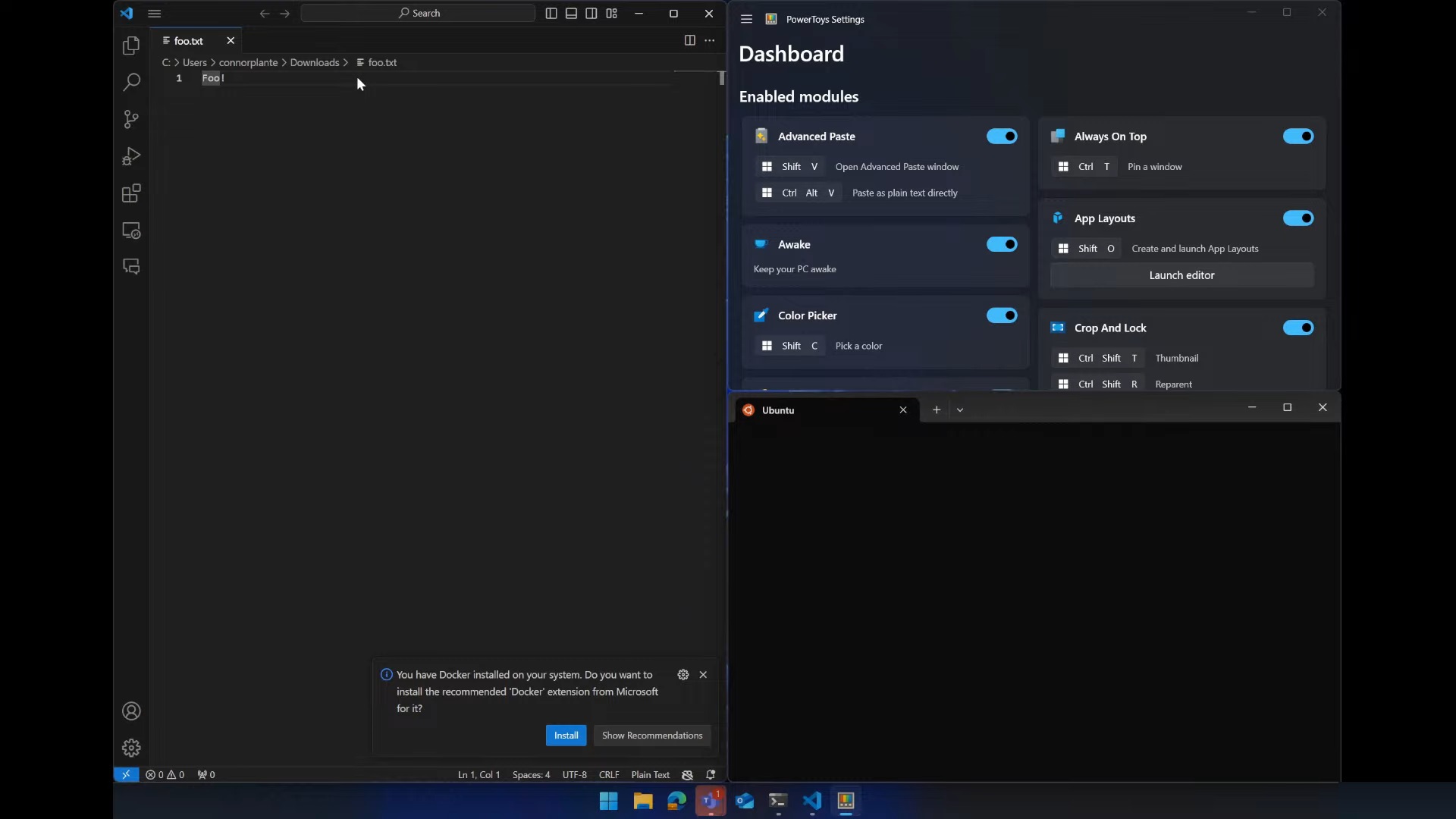
    Referred to as App Layouts in preliminary stages, this feature will be officially named Workspaces when it appears in PowerToys version 0.84. The process involves arranging your apps across your monitors and then using a shortcut to take a “screenshot” of your desktop layout. This screenshot captures the arrangement of your apps rather than a traditional image.

    The configuration screen for Workspaces is reminiscent of the Snap Layouts interface, featuring icons for each app and their placement on the screen. Users can customize their layout by adding or removing apps and saving multiple configurations. Additionally, PowerToys Workspaces will support advanced features such as resizing windows to specific pixel dimensions and opening particular files with applications, making it ideal for both developers and enthusiasts.

    Microsoft has not yet announced a release date for Workspaces, but it will be included in the next update to PowerToys. With the current version at 0.83, the introduction of Workspaces in version 0.84 is expected soon.

    Post Views: 270
    Share. Facebook Twitter Pinterest LinkedIn Tumblr Email
    ayaksız
    • Website

    Related Posts

    Microsoft launches tool to gather user feedback on Windows issues

    Nisan 8, 2026

    Microsoft outlines major Windows 11 reset focused on performance

    Nisan 8, 2026

    Microsoft says Windows 11 will speed up by scaling back Copilot

    Nisan 8, 2026
    Add A Comment

    Comments are closed.

    Editors Picks
    8.5

    Apple Planning Big Mac Redesign and Half-Sized Old Mac

    Ocak 5, 2021

    Autonomous Driving Startup Attracts Chinese Investor

    Ocak 5, 2021

    Onboard Cameras Allow Disabled Quadcopters to Fly

    Ocak 5, 2021
    Top Reviews
    9.1

    Review: T-Mobile Winning 5G Race Around the World

    By sevketayaksiz
    8.9

    Samsung Galaxy S21 Ultra Review: the New King of Android Phones

    By sevketayaksiz
    8.9

    Xiaomi Mi 10: New Variant with Snapdragon 870 Review

    By sevketayaksiz
    Advertisement
    Demo
    Şevket Ayaksız
    Facebook X (Twitter) Instagram YouTube
    • Home
    • Adobe
    • microsoft
    • java
    • Oracle
    • Contact
    © 2026 Theme Designed by Şevket Ayaksız.

    Type above and press Enter to search. Press Esc to cancel.