

Close Menu
Şevket Ayaksız

    Subscribe to Updates

    Get the latest creative news from FooBar about art, design and business.

    What's Hot

    Google Maps vs Waze: I Put the Two Best Navigation Apps Head-to-Head — and One Clearly Came Out on Top

    Mayıs 1, 2026

    Samsung Electronics Offers Free 32-Inch Odyssey gaming monitor: Eligibility and How to Claim Deal

    Mayıs 1, 2026

    T-Mobile Bundles Free Hulu and Netflix for 5G Users: Eligibility Explained

    Mayıs 1, 2026
    Facebook X (Twitter) Instagram
    • software
    • Gadgets
    Facebook X (Twitter) Instagram
    Şevket AyaksızŞevket Ayaksız
    Subscribe
    • Home
    • Technology

      Google Maps vs Waze: I Put the Two Best Navigation Apps Head-to-Head — and One Clearly Came Out on Top

      Mayıs 1, 2026

      T-Mobile Bundles Free Hulu and Netflix for 5G Users: Eligibility Explained

      Mayıs 1, 2026

      This Portable Mini PC Is the Unexpected Raspberry Pi Alternative You Might Actually Want

      Mayıs 1, 2026

      Samsung warns RAM shortages could worsen beyond 2027

      Mayıs 1, 2026

      Oxford study finds friendly AI chatbots are less accurate

      Mayıs 1, 2026
    • Adobe
    • Microsoft
    • java
    • Oracle
    Şevket Ayaksız
    Anasayfa » Apt Commands Every Linux User Must Master for Maximum Efficiency
    software

    Apt Commands Every Linux User Must Master for Maximum Efficiency

    By mustafa efeMart 12, 2026Yorum yapılmamış2 Mins Read
    Facebook Twitter Pinterest LinkedIn Tumblr Email
    Share
    Facebook Twitter LinkedIn Pinterest Email

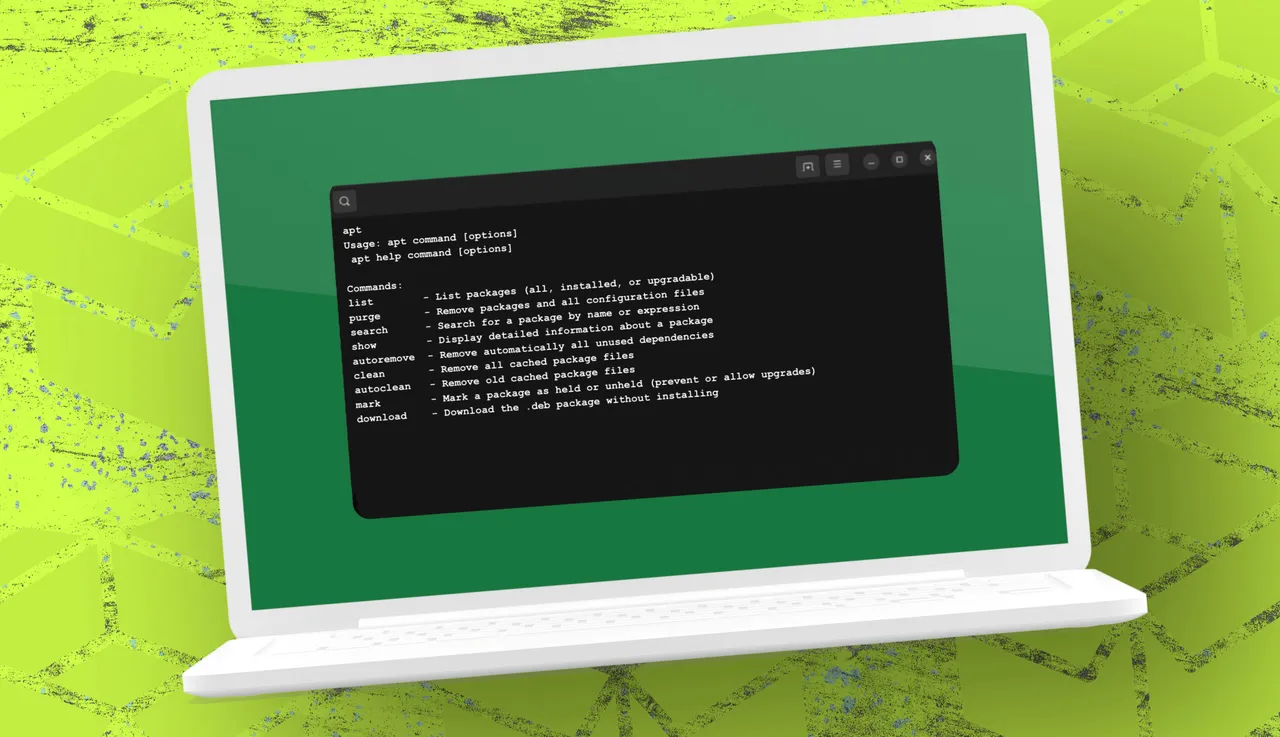
    How To Add, Remove and Update Software in Debian and Ubuntu Using Apt |  Tom's Hardware

    While most Linux users are familiar with basic apt commands like install, remove, update, and upgrade, the tool offers far more functionality that can make managing your system faster, cleaner, and more precise. For instance, using apt list lets you see which packages are installed, available, or upgradable, helping you keep track of potential updates. If you want to cleanly remove an application along with its leftover configuration files, apt purge ensures nothing is left behind. Searching for packages is easier with apt search, while apt show provides detailed information about any package before installation, including dependencies, conflicts, and source repositories.

    Maintenance commands like apt autoremove and apt clean are essential for keeping your system tidy. apt autoremove removes unnecessary dependencies left over from uninstalled applications, and apt clean clears cached package files, freeing up disk space while still allowing you to manage rollbacks and offline installations. Additionally, apt-mark is invaluable when you want to hold a package at its current version, preventing unwanted upgrades that might break certain features.

    Finally, the apt download command is perfect for scenarios where you need a package but don’t want to install it immediately—ideal for offline or air-gapped systems. By downloading the .deb file, you can transfer software securely to another machine without relying on network access. Mastering these eight commands transforms apt from a simple package installer into a powerful system management tool, helping Linux users optimize performance, maintain stability, and retain full control over their software environment.

    Post Views: 65
    Share. Facebook Twitter Pinterest LinkedIn Tumblr Email
    mustafa efe
    • Website

    Related Posts

    Anthropic’s Claude Security Tool Analyzes Codebases to Detect Vulnerabilities and Prioritize Fixes

    Mayıs 1, 2026

    Microsoft’s Windows Insider Program Finally Becomes More Streamlined and User-Friendly

    Nisan 11, 2026

    Microsoft launches tool to gather user feedback on Windows issues

    Nisan 8, 2026
    Add A Comment

    Comments are closed.

    Editors Picks
    8.5

    Apple Planning Big Mac Redesign and Half-Sized Old Mac

    Ocak 5, 2021

    Autonomous Driving Startup Attracts Chinese Investor

    Ocak 5, 2021

    Onboard Cameras Allow Disabled Quadcopters to Fly

    Ocak 5, 2021
    Top Reviews
    9.1

    Review: T-Mobile Winning 5G Race Around the World

    By sevketayaksiz
    8.9

    Samsung Galaxy S21 Ultra Review: the New King of Android Phones

    By sevketayaksiz
    8.9

    Xiaomi Mi 10: New Variant with Snapdragon 870 Review

    By sevketayaksiz
    Advertisement
    Demo
    Şevket Ayaksız
    Facebook X (Twitter) Instagram YouTube
    • Home
    • Adobe
    • microsoft
    • java
    • Oracle
    • Contact
    © 2026 Theme Designed by Şevket Ayaksız.

    Type above and press Enter to search. Press Esc to cancel.