

Close Menu
Şevket Ayaksız

    Subscribe to Updates

    Get the latest creative news from FooBar about art, design and business.

    What's Hot

    Why I Switched From iPhone Hotspot to a 5G Travel Router for Good

    Nisan 18, 2026

    Apple AirTags Revisited After 5 Years: How They Stack Up Today

    Nisan 18, 2026

    Verizon Offers Free iPad or Apple Watch With New iPhone Purchase: Here’s How It Works

    Nisan 18, 2026
    Facebook X (Twitter) Instagram
    • software
    • Gadgets
    Facebook X (Twitter) Instagram
    Şevket AyaksızŞevket Ayaksız
    Subscribe
    • Home
    • Technology

      Why I Switched From iPhone Hotspot to a 5G Travel Router for Good

      Nisan 18, 2026

      Verizon Offers Free iPad or Apple Watch With New iPhone Purchase: Here’s How It Works

      Nisan 18, 2026

      How to Use AI Safely at Work: 4 Practical Tips

      Nisan 18, 2026

      Turn an Old Tablet into a Smart Home Control Hub

      Nisan 18, 2026

      Gemini Mac App Tested: Key Edge Over Web Version

      Nisan 18, 2026
    • Adobe
    • Microsoft
    • java
    • Oracle
    Şevket Ayaksız
    Anasayfa » Claude Code One-Click AI Project Setup in iTerm2 Using Claude Code
    software

    Claude Code One-Click AI Project Setup in iTerm2 Using Claude Code

    By mustafa efeNisan 6, 2026Yorum yapılmamış2 Mins Read
    Facebook Twitter Pinterest LinkedIn Tumblr Email
    Share
    Facebook Twitter LinkedIn Pinterest Email

    How to Install Claude Code on Mac/MacOS | How to Set Up Claude Code (2026)

    Using Claude Code has been a game-changer for my workflow, but managing multiple projects at once was initially cumbersome. While vibe coding saves time compared to manually writing code line by line, it still requires careful context management. Over the past few months, I’ve been developing two apps for Mac, iPhone, iPad, and Apple Watch—one of which is already in testing, while the other remains in early development. Both projects share a parent directory, which I soon realized could be leveraged to simplify my setup.

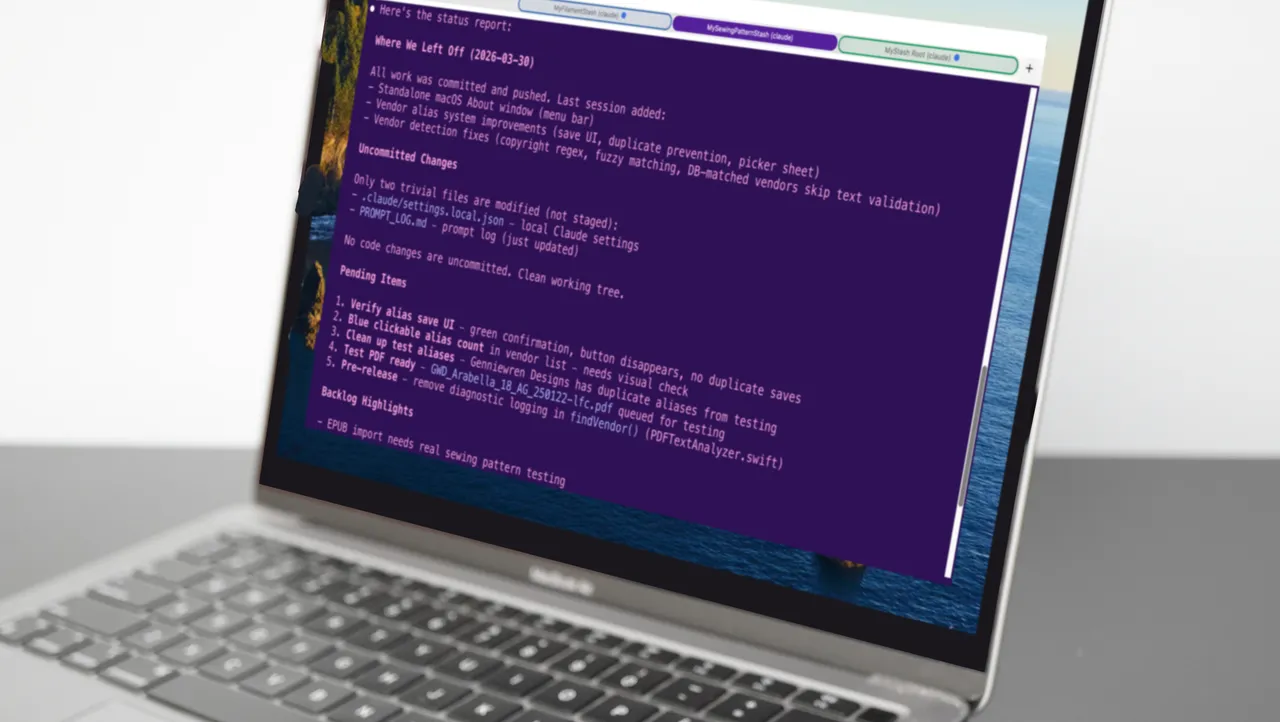
    Initially, I relied on a single Terminal window for each session. Claude Code treats the current working directory as the root of your project, using the CLAUDE.MD file to understand the context. For me, /Users/david/Documents/Development/xcode contains both app projects, MyFilamentStash and MySewingPatternStash. Before optimizing my workflow, I would cd into one project folder, launch Claude, and feed it startup commands to bring it up to speed on my prior work. Switching between projects meant quitting Claude, cd-ing to another directory, and repeating the setup—a process that was slow and error-prone.

    I realized that juggling multiple terminal windows was technically possible, but it often left me confused about which project was active. Each instance of Claude Code is tied to the directory it’s launched from, so managing context across multiple projects required constant mental tracking. Even with only three directories to handle, this became tedious and slowed down development significantly.

    To streamline the workflow, I set up a single iTerm2 command that could launch Claude Code in all three project contexts with one click. By scripting the launches and organizing each project session in dedicated iTerm2 tabs, I could instantly access all my working directories without repeatedly quitting and restarting Claude. This setup not only reduces context-switching friction but also ensures each project is properly isolated while still being accessible from a unified interface—a simple trick that saved me hours each week.

    Post Views: 31
    Code
    Share. Facebook Twitter Pinterest LinkedIn Tumblr Email
    mustafa efe
    • Website

    Related Posts

    Microsoft’s Windows Insider Program Finally Becomes More Streamlined and User-Friendly

    Nisan 11, 2026

    Microsoft launches tool to gather user feedback on Windows issues

    Nisan 8, 2026

    Microsoft outlines major Windows 11 reset focused on performance

    Nisan 8, 2026
    Add A Comment

    Comments are closed.

    Editors Picks
    8.5

    Apple Planning Big Mac Redesign and Half-Sized Old Mac

    Ocak 5, 2021

    Autonomous Driving Startup Attracts Chinese Investor

    Ocak 5, 2021

    Onboard Cameras Allow Disabled Quadcopters to Fly

    Ocak 5, 2021
    Top Reviews
    9.1

    Review: T-Mobile Winning 5G Race Around the World

    By sevketayaksiz
    8.9

    Samsung Galaxy S21 Ultra Review: the New King of Android Phones

    By sevketayaksiz
    8.9

    Xiaomi Mi 10: New Variant with Snapdragon 870 Review

    By sevketayaksiz
    Advertisement
    Demo
    Şevket Ayaksız
    Facebook X (Twitter) Instagram YouTube
    • Home
    • Adobe
    • microsoft
    • java
    • Oracle
    • Contact
    © 2026 Theme Designed by Şevket Ayaksız.

    Type above and press Enter to search. Press Esc to cancel.