

Close Menu
Şevket Ayaksız

    Subscribe to Updates

    Get the latest creative news from FooBar about art, design and business.

    What's Hot

    Microsoft confirms Secure Boot certificate update issues on some PCs

    Temmuz 14, 2026

    Copilot can now explain why your PC feels slow

    Temmuz 14, 2026

    Windows 10 ESU confirmation emails may be hiding in Outlook

    Temmuz 14, 2026
    Facebook X (Twitter) Instagram
    • software
    • Gadgets
    Facebook X (Twitter) Instagram
    Şevket AyaksızŞevket Ayaksız
    Subscribe
    • Home
    • Technology

      Innocn’s 49-inch ultrawide monitor hits a record-low $500 for Prime Day

      Temmuz 12, 2026

      Sony 1000X The Collexion vs. Bowers & Wilkins Px8 S2: Which Premium Headphones Come Out on Top?

      Temmuz 11, 2026

      SpaceX Eyes Massive Starlink Expansion With Plans for 100,000 Additional Satellites

      Temmuz 11, 2026

      Nvidia celebrates 30 years of GPUs with free GeForce trading cards

      Temmuz 10, 2026

      Acer’s 7-in-1 wireless charging station drops to $50

      Temmuz 9, 2026
    • Adobe
    • Microsoft
    • java
    • Oracle
    Şevket Ayaksız
    Anasayfa » Budget-Friendly Home Security: Transform Your Old iPhone or Android Into a Smart Camera
    Gadgets

    Budget-Friendly Home Security: Transform Your Old iPhone or Android Into a Smart Camera

    By ayaksızAralık 25, 2023Yorum yapılmamış3 Mins Read
    Facebook Twitter Pinterest LinkedIn Tumblr Email
    Share
    Facebook Twitter LinkedIn Pinterest Email

    Did you unwrap a shiny new iPhone 15, Pixel 8, or Galaxy Flip during the holidays? Congratulations! However, don’t relegate your former smartphone to obscurity just yet. A nifty way to repurpose it is by transforming it into a home security camera—an economical solution to keep tabs on your home when you’re away. Converting your old phone into a security camera is surprisingly simple, and in just three steps, you can enhance your home’s safety. Read on to discover how to repurpose your old smartphone while considering what to do with the other devices stowed away.


    Step 1: Install a Security Camera App on Your Old Phone

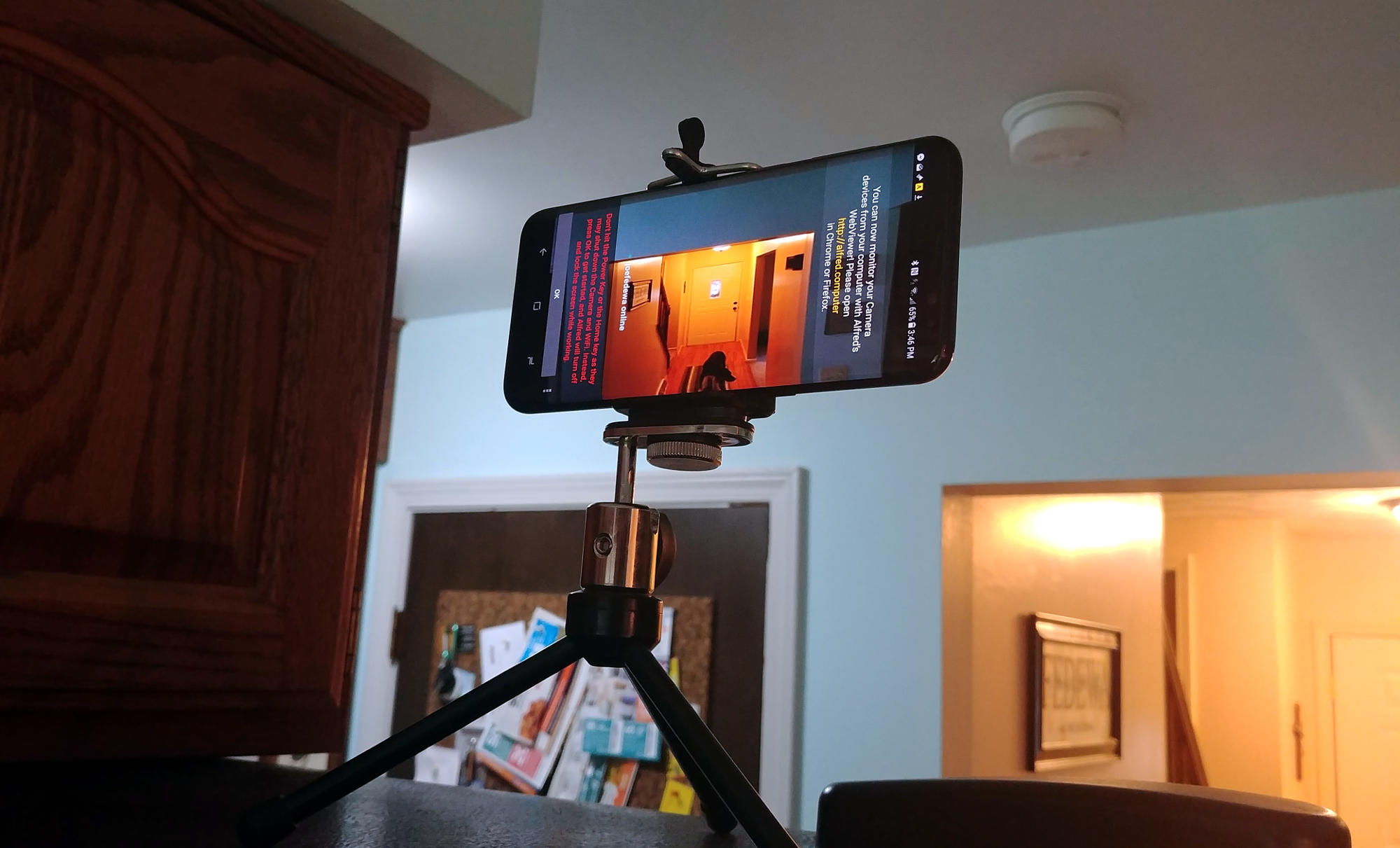
    To kick off the process, select a security camera app for your old phone. Numerous apps offer features like local and cloud streaming, motion detection, and recording. Alfred, a cross-platform option, stands out, providing remote viewing, motion alerts, free cloud storage, and two-way audio. Install Alfred on both your old and new phones, or any tablets you plan to use. Follow the setup steps, sign in with your Google account, and you’re ready to monitor your space from your new device.


    Step 2: Choose a Spot for Your Phone Security Camera

    Now that the stream is running, determine where to position the camera. Focus on crucial points like the main entry, backyard, or areas holding valuables. Multiple old phones allow you to set up a comprehensive video coverage system. Consider innovative spots, and if needed, invest in accessories like a smartphone tripod, suction-cup car mount, or a wide-angle lens for a broader field of view.


    Step 3: Mount and Power Your New Security Camera

    Mounting the camera can be done with a smartphone tripod or suction-cup car mount, strategically placed for an inconspicuous setup. Enhance the field of view with a wide-angle lens, available online for a modest price. As streaming video is power-intensive, ensure a continuous power supply by positioning the phone close to an outlet. A long Micro-USB or Lightning cable offers flexibility in placement.


    Voila! Your old smartphone is now a functional security camera. Access the live feed and control your DIY home security system with the security cam app on your new phone. A cost-effective approach to bolstering home security, this three-step guide lets you make the most out of your former device. For additional insights, explore tips for optimizing your home security camera, turning your Alexa device into a security tool, and the top DIY home security systems.

    Post Views: 414
    Home Security Phone security
    Share. Facebook Twitter Pinterest LinkedIn Tumblr Email
    ayaksız
    • Website

    Related Posts

    Logitech M720 Triathlon mouse drops to $29 for Prime Day

    Temmuz 12, 2026

    Ugreen’s 4-pack of Bluetooth trackers costs less than a single AirTag

    Temmuz 10, 2026

    Anker’s 100W USB-C cables drop to $10 for a 2-pack

    Temmuz 9, 2026
    Add A Comment

    Comments are closed.

    Editors Picks
    8.5

    Apple Planning Big Mac Redesign and Half-Sized Old Mac

    Ocak 5, 2021

    Autonomous Driving Startup Attracts Chinese Investor

    Ocak 5, 2021

    Onboard Cameras Allow Disabled Quadcopters to Fly

    Ocak 5, 2021
    Top Reviews
    9.1

    Review: T-Mobile Winning 5G Race Around the World

    By sevketayaksiz
    8.9

    Samsung Galaxy S21 Ultra Review: the New King of Android Phones

    By sevketayaksiz
    8.9

    Xiaomi Mi 10: New Variant with Snapdragon 870 Review

    By sevketayaksiz
    Advertisement
    Demo
    Şevket Ayaksız
    Facebook X (Twitter) Instagram YouTube
    • Home
    • Adobe
    • microsoft
    • java
    • Oracle
    • Contact
    © 2026 Theme Designed by Şevket Ayaksız.

    Type above and press Enter to search. Press Esc to cancel.