

Close Menu
Şevket Ayaksız

    Subscribe to Updates

    Get the latest creative news from FooBar about art, design and business.

    What's Hot

    Why I Switched From iPhone Hotspot to a 5G Travel Router for Good

    Nisan 18, 2026

    Apple AirTags Revisited After 5 Years: How They Stack Up Today

    Nisan 18, 2026

    Verizon Offers Free iPad or Apple Watch With New iPhone Purchase: Here’s How It Works

    Nisan 18, 2026
    Facebook X (Twitter) Instagram
    • software
    • Gadgets
    Facebook X (Twitter) Instagram
    Şevket AyaksızŞevket Ayaksız
    Subscribe
    • Home
    • Technology

      Why I Switched From iPhone Hotspot to a 5G Travel Router for Good

      Nisan 18, 2026

      Verizon Offers Free iPad or Apple Watch With New iPhone Purchase: Here’s How It Works

      Nisan 18, 2026

      How to Use AI Safely at Work: 4 Practical Tips

      Nisan 18, 2026

      Turn an Old Tablet into a Smart Home Control Hub

      Nisan 18, 2026

      Gemini Mac App Tested: Key Edge Over Web Version

      Nisan 18, 2026
    • Adobe
    • Microsoft
    • java
    • Oracle
    Şevket Ayaksız
    Anasayfa » Chromebooks Now Support Custom Mouse and Keyboard Shortcuts
    software

    Chromebooks Now Support Custom Mouse and Keyboard Shortcuts

    By ayaksızNisan 6, 2024Yorum yapılmamış1 Min Read
    Facebook Twitter Pinterest LinkedIn Tumblr Email
    Share
    Facebook Twitter LinkedIn Pinterest Email

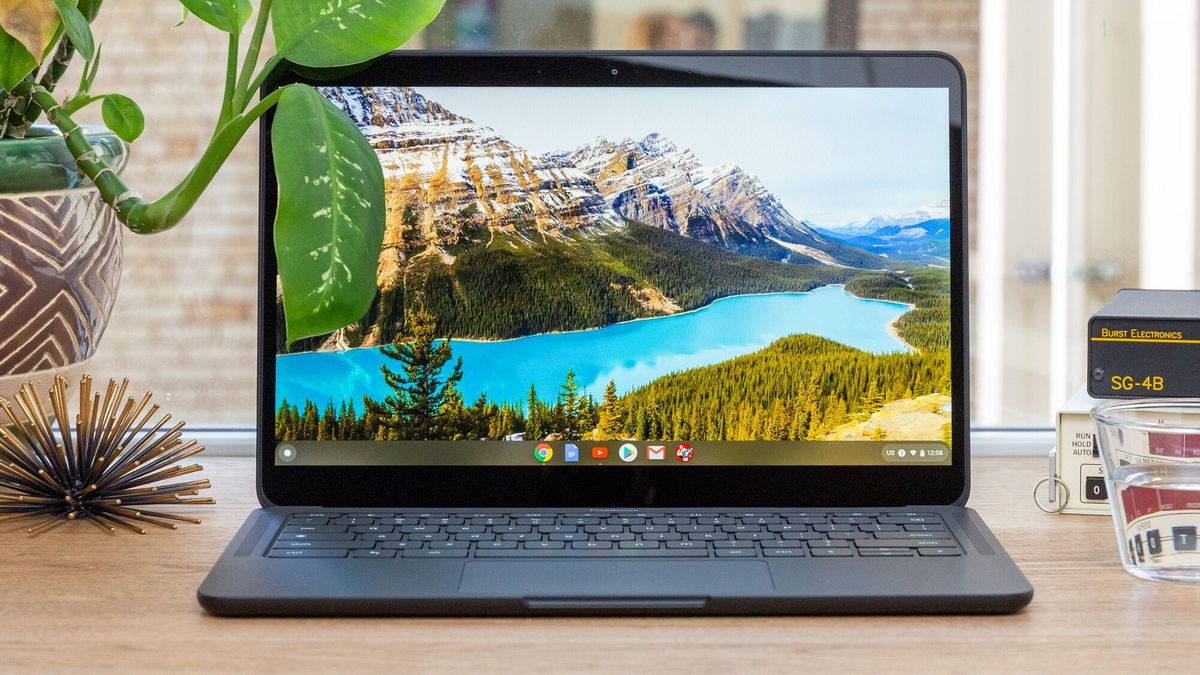
    ChromeOS has long been on a journey of evolution, striving to keep pace with other operating systems in terms of functionality and usability. In its latest update, ChromeOS introduces a feature that’s sure to delight users who frequently switch between Chromebooks and other devices: the ability to customize keyboard shortcuts and mouse buttons.

    This update, announced on Google’s Chromebook support page and reported by The Verge, brings customization options to ChromeOS version M123, available for download and installation on all compatible Chromebooks. To access these customization options, users can navigate to the Settings menu, then to Device > Keyboard > Customize Keyboard Keys and Device > Mouse > Customize mouse buttons.

    Having tested this feature myself, I find it to be a valuable tool for adapting keyboards with non-standard layouts to the Chromebook environment, as well as for accommodating the unique design quirks of Chromebooks, such as the substitution of the Search button for Caps Lock. The mouse customization feature is particularly beneficial for users with gaming mice boasting numerous thumb buttons, as ChromeOS seamlessly recognizes and integrates these additional inputs. Overall, it’s a neat addition that enhances the flexibility and user-friendliness of ChromeOS.

    Post Views: 259
    Share. Facebook Twitter Pinterest LinkedIn Tumblr Email
    ayaksız
    • Website

    Related Posts

    Microsoft’s Windows Insider Program Finally Becomes More Streamlined and User-Friendly

    Nisan 11, 2026

    Microsoft launches tool to gather user feedback on Windows issues

    Nisan 8, 2026

    Microsoft outlines major Windows 11 reset focused on performance

    Nisan 8, 2026
    Add A Comment

    Comments are closed.

    Editors Picks
    8.5

    Apple Planning Big Mac Redesign and Half-Sized Old Mac

    Ocak 5, 2021

    Autonomous Driving Startup Attracts Chinese Investor

    Ocak 5, 2021

    Onboard Cameras Allow Disabled Quadcopters to Fly

    Ocak 5, 2021
    Top Reviews
    9.1

    Review: T-Mobile Winning 5G Race Around the World

    By sevketayaksiz
    8.9

    Samsung Galaxy S21 Ultra Review: the New King of Android Phones

    By sevketayaksiz
    8.9

    Xiaomi Mi 10: New Variant with Snapdragon 870 Review

    By sevketayaksiz
    Advertisement
    Demo
    Şevket Ayaksız
    Facebook X (Twitter) Instagram YouTube
    • Home
    • Adobe
    • microsoft
    • java
    • Oracle
    • Contact
    © 2026 Theme Designed by Şevket Ayaksız.

    Type above and press Enter to search. Press Esc to cancel.