


Utilize response compression middleware in ASP.NET Core to minimize bandwidth usage and boost your applications’ performance and responsiveness.
As a cutting-edge web framework, ASP.NET Core offers integrated support for response compression, enabling developers to minimize the size of their responses and enhance loading times. In this article, we’ll delve into the mechanics of response compression and explore how to effectively utilize response compression middleware within ASP.NET Core applications.
Response compression is an effective technique for reducing network traffic, resulting in faster data transfer between web servers and clients. It works by compressing response data before it is sent over the network, significantly decreasing the amount of bandwidth consumed. Among the most widely used compression algorithms are Brotli, Gzip, and Deflate, all of which are supported by most modern web browsers. By default, ASP.NET Core’s response compression middleware employs Brotli or Gzip, selecting the algorithm that is supported by the client’s browser.
To implement response compression, we will use middleware, which acts as a component in the request processing pipeline. It’s important to note that if your ASP.NET Core application is hosted on web servers like IIS, Apache, or Nginx, leveraging the built-in compression features of these servers is recommended for optimal performance. The response compression middleware should only be considered when the hosting environment lacks built-in compression capabilities, such as with Kestrel, the default web server for ASP.NET Core.
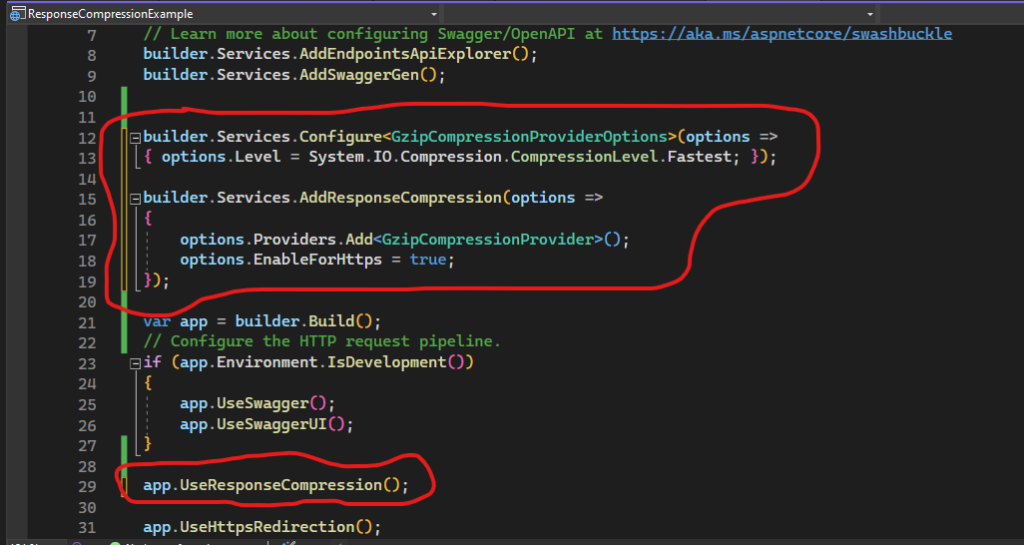
In ASP.NET Core, the application pipeline consists of a series of request delegates that are executed in order. This allows developers to chain together various middleware components, including response compression, to tailor the request-handling process. The configuration for this middleware pipeline is typically done in the Program.cs file, where you can enable and configure the response compression features.
When adding response compression middleware to your application, you’ll want to ensure that it is registered correctly in the service collection and added to the request processing pipeline. This involves calling services.AddResponseCompression() in the ConfigureServices method and using app.UseResponseCompression() in the Configure method. This setup allows the middleware to handle responses efficiently, compressing them based on the client’s capabilities.
Finally, monitoring the effectiveness of response compression in your application can help you assess performance improvements. Tools like browser developer tools or server monitoring solutions can provide insights into response sizes before and after compression is applied. By optimizing your application’s response sizes, you’ll not only enhance user experience but also reduce the load on your server, paving the way for a more efficient web application.