

- Expert’s Evaluation: 4.5/5
Advantages:
- User-friendly and intuitive interface
- Swift and efficient data folder operations
- Granular scheduling with one-minute intervals
- Seamless background operations
Drawbacks:
- Default settings may lead to operational errors with system folders
- Lack of support for online storage
Verdict: Second Copy proves its worth in managing data folders, even in network environments, offering precise scheduling options down to one-minute intervals. Priced at $30, this file backup and folder sync program operates effortlessly in the background, making it a compelling alternative for users seeking an upgrade from built-in options like Windows File History or free tools such as FBackup.
Exploring Second Copy’s Capabilities:
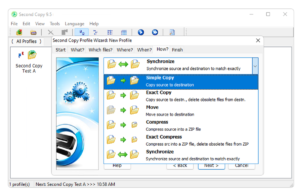
- Simple Copy: Transfers files from a source folder to a destination.
- Exact Copy (Mirroring): Copies new files and deletes unmatched files in the destination.
- Compression: Performs operations while compressing files into a standard Zip format.
- Network Compatibility: Supports network locations as both source and destination.
- True Synchronization: Deletes/Adds files in both directories to match changes, similar to online services.
- Move Function: Deletes files from the source after copying them to the destination.
User Interface and Experience:
- Simple, straightforward interface, though slightly dated in appearance.
- Intuitive navigation, allowing users with some backup knowledge to adapt quickly.
- Step-by-step job creation process facilitates easy learning for newcomers.
Advanced Features and Considerations:
- Archiving option to save older file versions in a separate directory.
- Option to overwrite files in the destination, accompanied by a cautionary note.
- Operates in the system tray with its VSS service and scheduler running in the background.
Performance Insights:
- Not a real-time backup solution, but scheduling can be as frequent as every minute.
- Excellent performance observed in copying plain data folders across various drives.
- Challenges encountered when copying the Users folder due to symbolic links, requiring user intervention.
- Configuration adjustment (e.g., “SkipLinkFiles=1”) may be needed, potentially warranting default consideration.
Compatibility and Limitations:
- No support for S3-compatible vendors and some common online storage services.
- Exclusive locks in Windows pose challenges in copying certain system files, necessitating user-configured adjustments.
Second Copy excels in efficient data folder backup and synchronization, complemented by a user-friendly interface. While facing occasional hurdles with system folders and lacking compatibility with certain online storage services, its granular scheduling and seamless background operation make it a noteworthy choice for users seeking a reliable and cost-effective file backup solution. Users should be mindful of potential configuration adjustments for specific scenarios, such as symbolic links in the Users folder.
Centered Systems $29.95 VIEW DEAL