


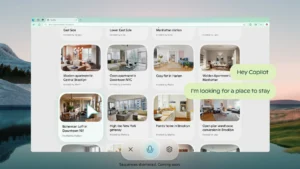
Microsoft Teases Copilot Vision for Windows and Mobile
Imagine having a built-in assistant in Windows that doesn’t just tell you what to do, but visually shows you, step by step, how to accomplish a task within an app. That’s the future Microsoft is envisioning with Copilot Vision, a new capability that blends real-time visual guidance with AI-powered interaction. As part of its 50th anniversary celebration, Microsoft has unveiled Copilot Vision for both Windows and mobile platforms — with the mobile version available now and the Windows edition arriving next week for Windows Insiders.
In a recorded demonstration released Friday, Microsoft showcased the desktop implementation of Copilot Vision in action. The video showed a user working in Adobe Photoshop while Copilot “followed” her activity and responded to her spoken request to adjust the image’s saturation. Instead of taking control or automating the process, Copilot highlighted the correct controls on the screen, guiding the user through each step visually. It was reminiscent of having a live tutor present — one who instructs but doesn’t interfere — empowering the user while minimizing disruption.
The mobile version of Copilot Vision takes a different but equally futuristic approach, resembling Google’s Project Astra. By using your phone’s camera to view the world in real time, Copilot can answer context-sensitive questions. Microsoft says users could ask it to diagnose a plant’s health, offer home decorating suggestions, or provide insights about objects in the environment. The potential is vast, but like many AI tools, its usefulness will depend heavily on the questions users ask and the accuracy of Copilot’s responses.
Naturally, the announcement has raised concerns among privacy-conscious users. Many remember the backlash that followed Microsoft’s introduction of the Recall feature, which continuously captured screen content and stored it in a poorly secured database. After significant criticism, Microsoft revised Recall’s privacy model. This time around, Microsoft seems to be taking a more cautious approach. Copilot Vision is designed to activate only when triggered by the user — either by holding Alt + Space for two seconds or by pressing and holding the new Copilot key. It’s not an always-on surveillance tool, but a reactive assistant that responds only when needed.
If Microsoft can deliver Copilot Vision as promised, it could dramatically change how users interact with complex software — bridging the gap between human intent and digital execution. Whether it becomes a transformative tool or another overhyped feature remains to be seen, but Windows users won’t have to wait long to try it themselves. The rollout to Insiders begins next week, with wider availability planned through the Windows app later this year.