

Close Menu
Şevket Ayaksız

    Subscribe to Updates

    Get the latest creative news from FooBar about art, design and business.

    What's Hot

    Google Maps vs Waze: I Put the Two Best Navigation Apps Head-to-Head — and One Clearly Came Out on Top

    Mayıs 1, 2026

    Samsung Electronics Offers Free 32-Inch Odyssey gaming monitor: Eligibility and How to Claim Deal

    Mayıs 1, 2026

    T-Mobile Bundles Free Hulu and Netflix for 5G Users: Eligibility Explained

    Mayıs 1, 2026
    Facebook X (Twitter) Instagram
    • software
    • Gadgets
    Facebook X (Twitter) Instagram
    Şevket AyaksızŞevket Ayaksız
    Subscribe
    • Home
    • Technology

      Google Maps vs Waze: I Put the Two Best Navigation Apps Head-to-Head — and One Clearly Came Out on Top

      Mayıs 1, 2026

      T-Mobile Bundles Free Hulu and Netflix for 5G Users: Eligibility Explained

      Mayıs 1, 2026

      This Portable Mini PC Is the Unexpected Raspberry Pi Alternative You Might Actually Want

      Mayıs 1, 2026

      Samsung warns RAM shortages could worsen beyond 2027

      Mayıs 1, 2026

      Oxford study finds friendly AI chatbots are less accurate

      Mayıs 1, 2026
    • Adobe
    • Microsoft
    • java
    • Oracle
    Şevket Ayaksız
    Anasayfa » Transform Your Windows File Explorer Using This Free Tool
    Windows

    Transform Your Windows File Explorer Using This Free Tool

    By ayaksızAğustos 11, 2024Yorum yapılmamış2 Mins Read
    Facebook Twitter Pinterest LinkedIn Tumblr Email
    Share
    Facebook Twitter LinkedIn Pinterest Email

    Despite its many updates, Windows File Explorer has rarely felt groundbreaking in either its visual design or its features. This trend reflects Microsoft’s broader approach to incremental improvements rather than revolutionary changes.

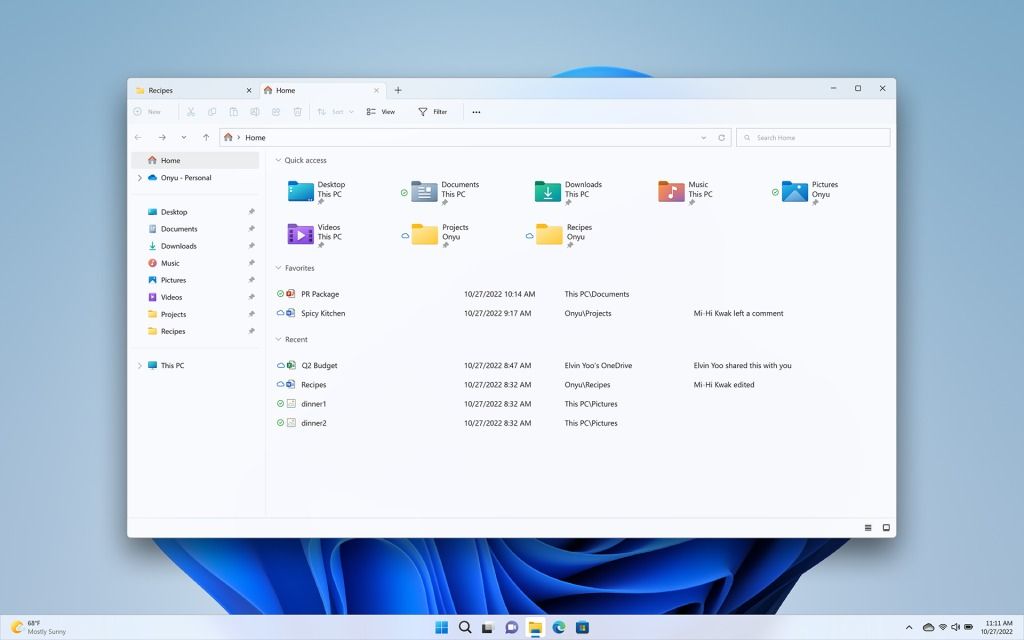
    Fortunately, users now have an alternative in the form of Files, a free third-party app that brings a sleek, modern design and enhanced functionality to File Explorer. Files offers a range of improvements, including cloud integration, tabbed browsing, customizable layouts, superior file previews, and more.

    A Revitalized User Interface

    Windows 10 and 11 users often find File Explorer’s design to be uninspiring. Files addresses this with a modern interface that includes various themes and color options, such as a dark mode that reduces visual fatigue. The app provides a cleaner look, with quick access to frequently used folders and cloud storage platforms like Google Drive, iCloud, and Dropbox.

    Customization options are also available, allowing users to select different fonts, adjust transparency settings, or set a unique background for File Explorer.

    Enhanced Features for Greater Efficiency

    Files introduces several advanced features to boost File Explorer’s capabilities:

    • Split-view for managing two windows simultaneously
    • Tabbed browsing for easier navigation
    • Integration with cloud storage services
    • A file tagging system for improved organization
    • Options to copy and save file paths
    • Enhanced context menus
    • Elevated admin privileges
    • Automatic extraction of ZIP and RAR files

    These features are particularly useful for Windows 10 users, although Windows 11 users will benefit from enhancements like the split-view functionality and improved file tagging options. The app also enhances file previews, making it easier to locate and manage your files.

    How to Obtain Files

    The Files app can be downloaded from its official website. It is available as a free, open-source tool via the “classic installer,” but there is also a $9 version available through the Microsoft Store for those who wish to support the development. As an open-source project, contributions to its ongoing development are encouraged.

    Post Views: 279
    Share. Facebook Twitter Pinterest LinkedIn Tumblr Email
    ayaksız
    • Website

    Related Posts

    Windows 11 April update breaks some third-party backup apps

    Mayıs 1, 2026

    Windows 11 fixes two major design complaints, including taskbar limits

    Nisan 8, 2026

    Windows 11 finally overtakes as the dominant PC OS

    Nisan 8, 2026
    Add A Comment

    Comments are closed.

    Editors Picks
    8.5

    Apple Planning Big Mac Redesign and Half-Sized Old Mac

    Ocak 5, 2021

    Autonomous Driving Startup Attracts Chinese Investor

    Ocak 5, 2021

    Onboard Cameras Allow Disabled Quadcopters to Fly

    Ocak 5, 2021
    Top Reviews
    9.1

    Review: T-Mobile Winning 5G Race Around the World

    By sevketayaksiz
    8.9

    Samsung Galaxy S21 Ultra Review: the New King of Android Phones

    By sevketayaksiz
    8.9

    Xiaomi Mi 10: New Variant with Snapdragon 870 Review

    By sevketayaksiz
    Advertisement
    Demo
    Şevket Ayaksız
    Facebook X (Twitter) Instagram YouTube
    • Home
    • Adobe
    • microsoft
    • java
    • Oracle
    • Contact
    © 2026 Theme Designed by Şevket Ayaksız.

    Type above and press Enter to search. Press Esc to cancel.